


Grammar Check by AI Writing
4.3619.00 Reviews
App Specs
- Version
- 2.0.0
- Updated On
- License
- Free
- Downloads
- 1,000,000+
- Developer
- Metaverse Labs
- Categories
- Education
- Platform
- Android
Screenshots
 Analysis by AppCompare
I’d judge a writing checker by a practical standard: can it help me fix a sentence without taking over my voice? Grammar Check by AI Writing is aimed at everyday writing, where a missed agreement, awkward phrase or spelling slip can distract from the point. I see its strongest role as a quick review partner, not an authority whose every suggestion should be accepted.
That distinction matters because writing tools are useful in different ways. A keyboard’s built-in correction is convenient for typos while composing, while a full word processor is better suited to longer documents and detailed formatting. This app brings grammar checking together with paraphrasing, auto-correction, a dictionary and writing assistance, so it may suit someone who wants several kinds of help close at hand rather than switching between separate tools.
Choose it for a second look, not a final verdict
My decision rule is simple: use a checker to notice things you might overlook, then make the final call yourself. Grammar is only one part of clear writing. A sentence can be technically correct and still sound cold, vague or unlike you. Read suggested changes aloud, especially in a message where tone matters, and keep the original if the rewrite loses an important shade of meaning.
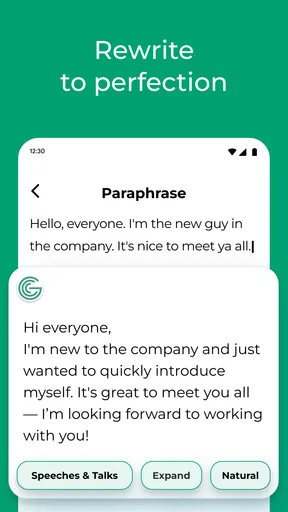
That approach is particularly useful with paraphrasing. It can help when I know what I mean but cannot find a clean way to say it, yet a rewritten sentence still needs a fact check and a voice check. I would not treat a generated alternative as proof that the wording is accurate or appropriate. For work involving sensitive details, I’d also avoid pasting information into any writing assistant unless I’m comfortable with how that service handles it.
A practical fit for short, mixed writing tasks
Metaverse Labs’ education app is free to download, carries an Everyone age rating and has a 4.2 average from around 23,000 ratings. It has passed 1 million installs, which suggests it has reached a broad audience, though popularity alone doesn’t tell me whether its suggestions will fit a particular writer. I’d try it on a few ordinary sentences before relying on it for a high-stakes document.
A realistic use is preparing a message between other tasks: draft a note to a teacher, landlord or colleague, check it for obvious language slips, then reread it for the right tone before sending. The dictionary can be handy when a word feels almost right but its meaning is uncertain; the paraphrasing option can offer another route through a clumsy sentence. These are small assists, not substitutes for checking names, dates, promises or other important details yourself.
Where another kind of tool may be better
If I’m writing a long report, revising a carefully structured essay or collaborating on a document, I may prefer a word processor with editing and document-management tools built around that work. If I only need to catch misspellings in quick texts, the correction already available in my keyboard may be enough. This app makes more sense when I want a dedicated pass over wording and access to several writing aids in one place.
Worth Reading Before You Choose

EA SPORTS FC Mobile 26 Is a Bigger Football Game, but It Takes Time

Flipboard Shows What News Apps Must Do Beyond the Feed

Switching to Android Auto Means Rethinking Your Driving Routine

Google Calendar Makes a Crowded Week Easier to Manage

Ludo King Makes the Most of the Minutes Between Plans

Baby Panda World Brings Quick Play to Modern Phones, but Its Game Library Feels Busy
There is a trade-off in using any assistant that offers corrections and rewrites: it can make prose smoother while also flattening a deliberate style. I’d be cautious with jokes, personal messages, creative writing and subject-specific language. A checker may not know whether an unusual phrase is intentional, and an automatic correction can change meaning. Reviewing each change is a little slower than accepting everything, but it is the safer habit.
Consider the upgrade only after trying your routine
The app is free, with in-app purchases ranging from $3.99 to $99.99 per item. I’d start with the free experience and test the tasks I actually do—perhaps checking a short email, looking up a word and comparing a paraphrase with my original. That gives me a better basis for deciding whether a paid option adds enough value than upgrading because I assume I need every available tool.
Before moving an established workflow into a new app, consider the cost of switching in time and attention. You may need to get used to where its tools sit and decide which suggestions you trust. Keep your original text until you have reviewed a rewrite, and avoid making the app the only place a draft exists if that draft matters to you. Those habits make it easier to try the checker without letting it disrupt how you already write.
Using the checker with confidence
Released on March 6, 2023, the app is currently at version 1.9.39 and supports Android 7.0 or later. That makes it an option for people using compatible Android devices; I would check the relevant app store for availability on my own device before planning a workflow around it. The key question is less whether a checker can suggest a change and more whether it helps me make a better-informed choice about my wording.
First Impressions
Upon launching the app, the interface struck me as pretty sleek and intuitive. There’s no learning curve here, which is a huge win. You’re greeted with a clean layout that makes it easy to navigate through its features. Right off the bat, I appreciated how the developers kept it straightforward. It’s like they knew I didn’t have time to fumble around trying to figure things out. I mean, who does?
Features Galore
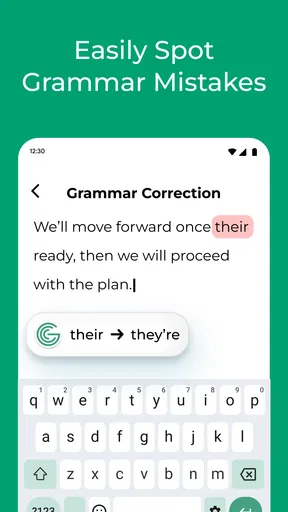
The Grammar Check by AI Writing app really packs a punch with its features. The real-time grammar correction is a standout. As you type, the app highlights errors and suggests corrections instantly. It’s like having a grammar-savvy friend looking over your shoulder, but without the judgmental side-eye.
Another feature that caught my eye is the style suggestions. It goes beyond basic grammar, diving into the nuances of writing style. Whether you’re crafting a formal email or a casual chat, the app tailors its suggestions to fit the context. This personal touch makes it feel less robotic and more like a personal writing coach.
Getting Down to the Nitty-Gritty
Let’s talk about the accuracy. I put it to the test with a few tricky sentences, and it didn’t disappoint. The app seems to have a knack for catching even the sneakiest of errors. From subject-verb agreement to dangling modifiers, it’s got you covered.
However, it’s not all sunshine and rainbows. There were moments when it felt a bit too eager with its suggestions. Sometimes, I wanted to keep my quirky sentence structure, thank you very much! But hey, nobody’s perfect, right?
Ease of Use
One of the things I really appreciate is how user-friendly this app is. Whether you’re on Android or iOS, the experience is seamless. The app integrates well with other platforms too, so you can easily use it with your favorite writing apps. It’s all about making life easier, and in that department, the app delivers.
Is It Worth It?
Now, the million-dollar question: Is it worth the download? Well, if you’re someone who wants to enhance their writing effortlessly, I’d say yes. While it might not replace a professional editor, it certainly comes close, especially for everyday writing tasks.
The free version offers a decent range of features, but if you’re looking to unlock its full potential, the premium upgrade is where it’s at. Think of it as investing in your communication skills. Plus, who doesn’t love a little extra polish on their prose?
Final Thoughts
In conclusion, the app is a solid tool for anyone looking to up their writing game. It’s user-friendly, packed with features, and does a commendable job at catching those pesky errors. While it might not be perfect, it’s certainly a step in the right direction for anyone wanting to write with confidence.
If you’re curious and want to give it a try, check out the download link on our website. Trust me, your future self will thank you for it!
For students, job applicants and people who write to customers, the most useful habit is to separate correction from judgement. I’d first let the checker identify possible issues, then review the whole paragraph rather than approving suggestions one by one without context. A local correction can make the grammar cleaner while leaving a confusing argument untouched, so I’d still check that each sentence says what I intend and that the message has a clear point.
Make a small test before trusting a longer draft
When trying a new writing assistant, I’d start with a few sentences that represent my normal work: a short request, a paragraph with a longer sentence and one with a name or technical term. This makes it easier to notice whether the tool’s changes are helpful or whether it keeps nudging my wording toward a style I don’t want. It is also a useful way to learn when to ignore a suggestion without letting a longer document become a trial-and-error exercise.
For language learners, the best value may be in treating corrections as prompts to investigate. If a sentence is changed, compare the original and revised versions and ask what changed in meaning, not just which one looks more polished. The dictionary can support that process, but a checker is not a complete language course: I would use trusted learning materials when I need an explanation of a rule or a reliable account of why one form is correct.
Keep control of voice and context
One non-obvious risk with quick rewriting is losing the relationship between a sentence and the conversation around it. A polite follow-up to a friend, a firm note about a missed deadline and a formal request may all need different levels of directness. I’d review paraphrases against the recipient and purpose, then restore any phrase that carries warmth, tact or emphasis the tool has smoothed away. The cleanest wording is not always the most human wording.
I would also be selective about what I check. A public-facing description or routine email is a sensible place to experiment; confidential workplace material, private correspondence or unpublished work may call for more caution. That is not a special flaw of this app so much as a sensible boundary for writing assistants in general. If the text is sensitive, I’d revise it without entering identifying details or choose an offline method I already trust.
Who should pass, and who should give it a try
I’d recommend trying it if you regularly write short messages and want more than basic spellcheck, or if you like having grammar help, a dictionary and paraphrasing available in the same writing routine. It may also suit someone who is learning to spot recurring mistakes, provided they treat suggestions as examples to assess rather than rules to obey blindly.
I’d skip it if your main need is professional editing, complex document collaboration or dependable review of specialized material. A human editor is better placed to judge argument, audience and nuance, while a subject expert can catch errors a general writing assistant might miss. It is also not the right choice if you want every sentence left untouched by automated suggestions; a simpler spellchecker may feel less intrusive.
A measured recommendation
My recommendation is to try the free app on everyday, low-risk writing and keep your own judgement in the loop. Grammar Check by AI Writing is most appealing as a convenient second pair of eyes for routine wording, not as a replacement for careful reading or expert review. If it saves you from repeated small errors without making your writing sound less like you, it has earned a place in your toolkit; if its changes create extra checking work, your existing keyboard or word processor may be the better fit.
Pros
- Accurate error detection for grammar issues.
- Real-time suggestions improve writing instantly.
- User-friendly interface for easy navigation.
- Supports multiple languages for diverse users.
- Integrates well with other writing tools.
Cons
- Limited offline functionality.
- Requires subscription for premium features.
- Occasional false positives in complex sentences.
- User data might be collected for improvements.
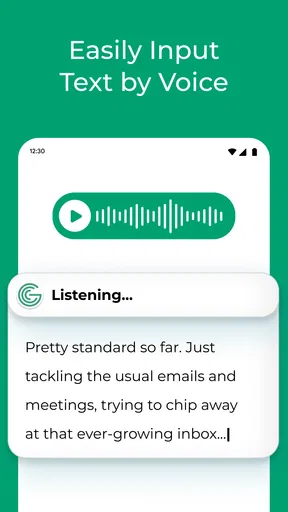
- Lacks voice input option.
FAQs for Grammar Check by AI Writing
What features does Grammar Check by AI Writing offer?
Grammar Check by AI Writing provides a comprehensive suite of tools to enhance your writing. It offers grammar and spell-check, style suggestions, and punctuation corrections. Additionally, it provides real-time feedback and suggestions for improving sentence structure and vocabulary, making it an invaluable tool for writers of all levels.
Is Grammar Check by AI Writing compatible with mobile devices?
Yes, Grammar Check by AI Writing is designed for both Android and iOS devices. The app ensures seamless integration across platforms, allowing users to edit and improve their documents on the go. Its mobile-friendly interface is optimized for ease of use, providing a smooth and efficient user experience.
Does Grammar Check by AI Writing support multiple languages?
Currently, Grammar Check by AI Writing primarily focuses on the English language. However, the developers are working on expanding its capabilities to include support for other major languages. This expansion aims to cater to a broader audience, enhancing its utility for non-native English speakers.
Is there a cost associated with using Grammar Check by AI Writing?
Grammar Check by AI Writing offers a free version with basic features, ideal for casual users. For more advanced tools and capabilities, a premium subscription is available. This subscription provides access to enhanced features like advanced style suggestions and a plagiarism checker, making it suitable for professional writers.
How does Grammar Check by AI Writing ensure user privacy?
User privacy is a top priority for Grammar Check by AI Writing. The app employs robust encryption methods to protect user data. It does not store personal documents or sensitive information on its servers, ensuring that your work remains confidential and secure during the editing process.


